
Ariens Parts Lookup & Diagrams
Ariens Parts by Equipment Type
- Ariens Blowers & Vacuums
- Ariens Edgers
- Ariens Engines
- Ariens Generators
- Ariens Lawn & Garden Tractors
- Ariens Log Splitters
- Ariens Power Brushes
- Ariens Pressure Washers
- Ariens Rear-Engine Riding Mowers
- Ariens Snow Blowers & Snow Throwers
- Ariens Stand-On Mowers
- Ariens Tillers
- Ariens Utility Vehicles
- Ariens Walk-Behind Mowers
- Ariens Walk-Behind Trimmers
- Ariens Zero-Turn Mowers
- Ariens Accessories & Attachments
Need help finding your Ariens model number?
Your Ariens equipment has a factory model number and serial number on a sticker-like label or metallic tag attached to the unit in a place away from moving parts (usually near the handle, under the seat, or on the side of the unit). The best way to buy repair parts for your Ariens is to begin by searching for your Ariens model number on PartsTree and use the OEM Ariens parts diagrams to find the parts that fit exactly like the originals from the Ariens factory. When you locate your Ariens model tag, take a picture for future repair parts needs.
What do Ariens model tags look like?
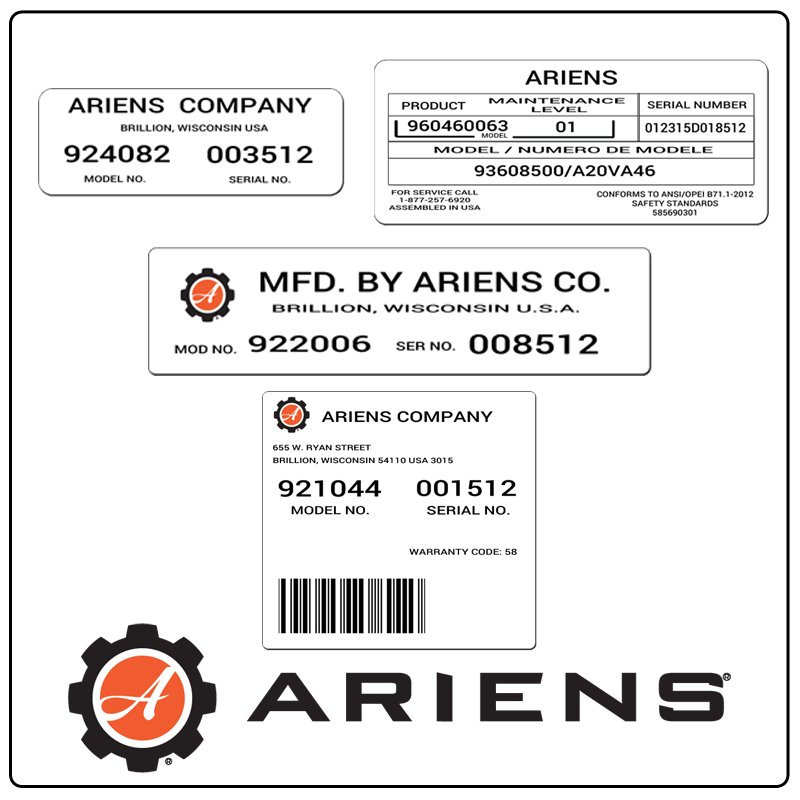
To buy engine parts for your Ariens, like an air filter, oil filter, fuel filter, spark plug, tune-up kit, or carburetor parts, you will likely need to search separately on PartsTree for your engine model. On Ariens equipment, the engine model and specification ("spec") numbers, as well as serial number and sometimes type and code, are often stamped above the muffler, by the spark plug, or near the overhead valve cover.